Pre Conversation:

  • We’ll agree on a good time to chat.
  • I’ll send you a few foundational questions a day or so beforehand.
  • You'll send me a short bio to intro you with, or leave it up to you to pepper throughout our conversation.

The Basics

  • I’ll send you a Zoom link.
  • We’ll chat for 45min to 1 hour – using the time upfront to align, chit chat and resolve any tech issues.
  • We’ll then start recording and aim for a fluid conversation between 20 to 30 minutes.


Style

  • My interview style is conversational and direct.
  • We’ll agree to avoid anything off limits or hit any key points before we start.
  • As soon as we hit record, we’ll aim for an excessively open dialogue.
  • Expect questions asking you to go deeper on anything offering listeners fundamental insights.
  • If anything uncomfortable comes up, we can can cut it from the recording.


Recording Setup

  • Please find the most quiet and comfortable spot around. A good wifi connection is imperative.
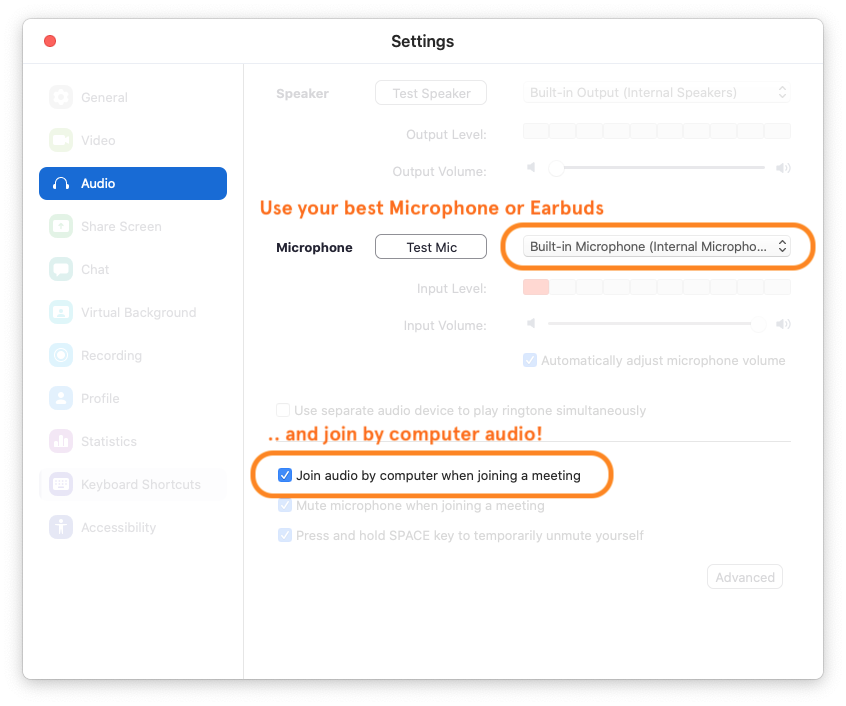
  • Please use your best microphone or earbuds for the best audio quality.
  • For the listeners benefit, I highly prefer we both record our conversation on our local devices


Post Conversation:I’ll follow up with a dropbox file request, allowing you to easily send the local recording to me.We’ll also use this link for any image or headshots you’d like to send over.

When your episode is live, I'll email you a link.

Ensuring the Best Audio Quality
We'll go over this at the beginning of our call.

If you want to get set up ahead of time, Zoom allows us to record audio individually, by choosing “Record a separate audio file for each participant” in your Preferences. This is the 2nd option listed in your Recording Preferences.

In more detail:
In Zoom, open Preferences > Recording > check on
☑️ "Record a separate audio file for each participant."

And under Audio > Microphone > Choose your best quality Microphone.

Once we start our call I’ll enable your recording privileges, and you’ll see a record button on the bottom right of your zoom window. An active recording message is then shown in the top left of your zoom window.

Post Conversation:I’ll follow up with a dropbox file request, allowing you to easily send the local recording to me.We’ll also use this link for any image or headshots you’d like to send over.

When your episode is live, I'll email you a link.
Latest Posts

our team
Simeon Peterson
Cofounder, Editor in Chief
Simeon Brekke
Cofounder, Partner
Annie Lueilwitz
Managing Editor
Reta Torphy
Managing Editor
Leo Bartell
Editor
Clem Onojeghuo
Senior Writer
Michal Legros
Senior Writer
Rosanna Ondricka
Writer
Alessandra Ortiz
Writer
Coby Gottlieb
Writer